Prepare before you go
Choose a sport and goal, review your training schedule, and check phone permissions and device connections.
Plans · Goals · Warm-up Sport MasterSPORT MASTER
RUN. SEE. GROW.
Keep your eyes on the path ahead.
Activity records, training plans and AI reviews
help you understand every step of progress.
Phone app · Activity tracking · Exploring AI glasses integration
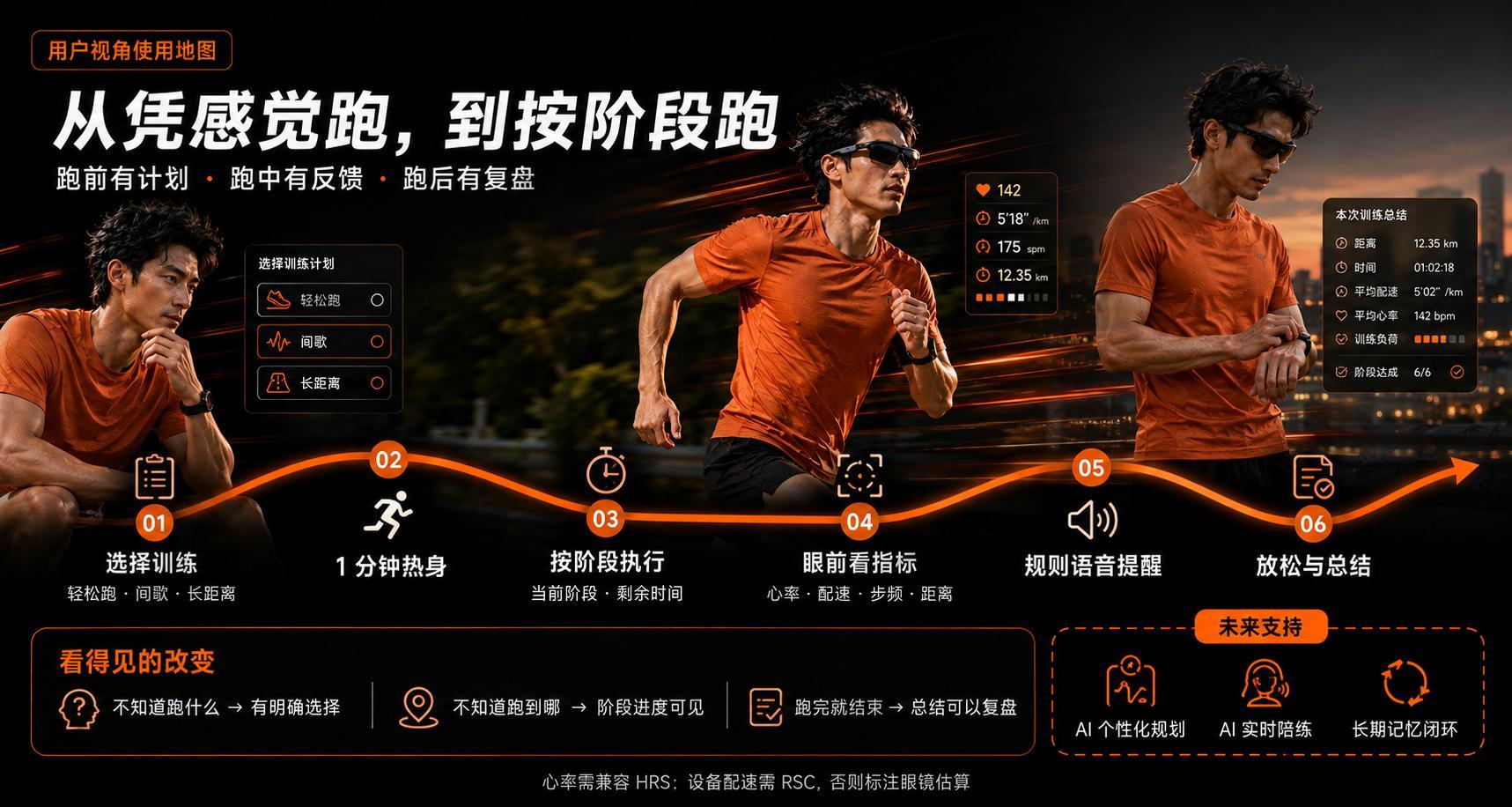
THE WAY YOU MOVE
01 — The experienceBring the whole activity together, from preparation to finish.
Use your own records to find a rhythm that suits you.
Choose a sport and goal, review your training schedule, and check phone permissions and device connections.
Plans · Goals · Warm-upYour phone records the activity while compatible glasses provide lightweight prompts, so you can focus on moving.
Tracking · Metrics · RhythmReview your activity and training performance to understand the session and prepare for the next one.
Summary · Review · ProgressFIND YOUR RUN
Record time, distance and pace, and plan activities around your own goals. Training plans and activity reviews help you follow your progress run by run.
TRAIN WITH CONTEXT
AI helps turn activity data into useful, understandable guidance.
Start with one activity record to give training a basis and reviews a focus.
Basic activity recording is free. AI coaching, intelligent training planning and cloud companion features require a verified, active paid membership; invitation rewards and ordinary PRO do not include paid AI. Payment, third-party AI data permission and EverMe authorization are separate choices. Shengwang real-time voice is not enabled. This page does not offer purchases or automatic renewal.
Review training plans and coaching suggestions in the context of your goals and activity.
Review your rhythm and performance using facts such as time, distance and pace.
With an active paid membership and your separate authorization, we are exploring long-term memory and ongoing support to give future conversations more context.
Ongoing support is still evolving. Available features depend on the current version.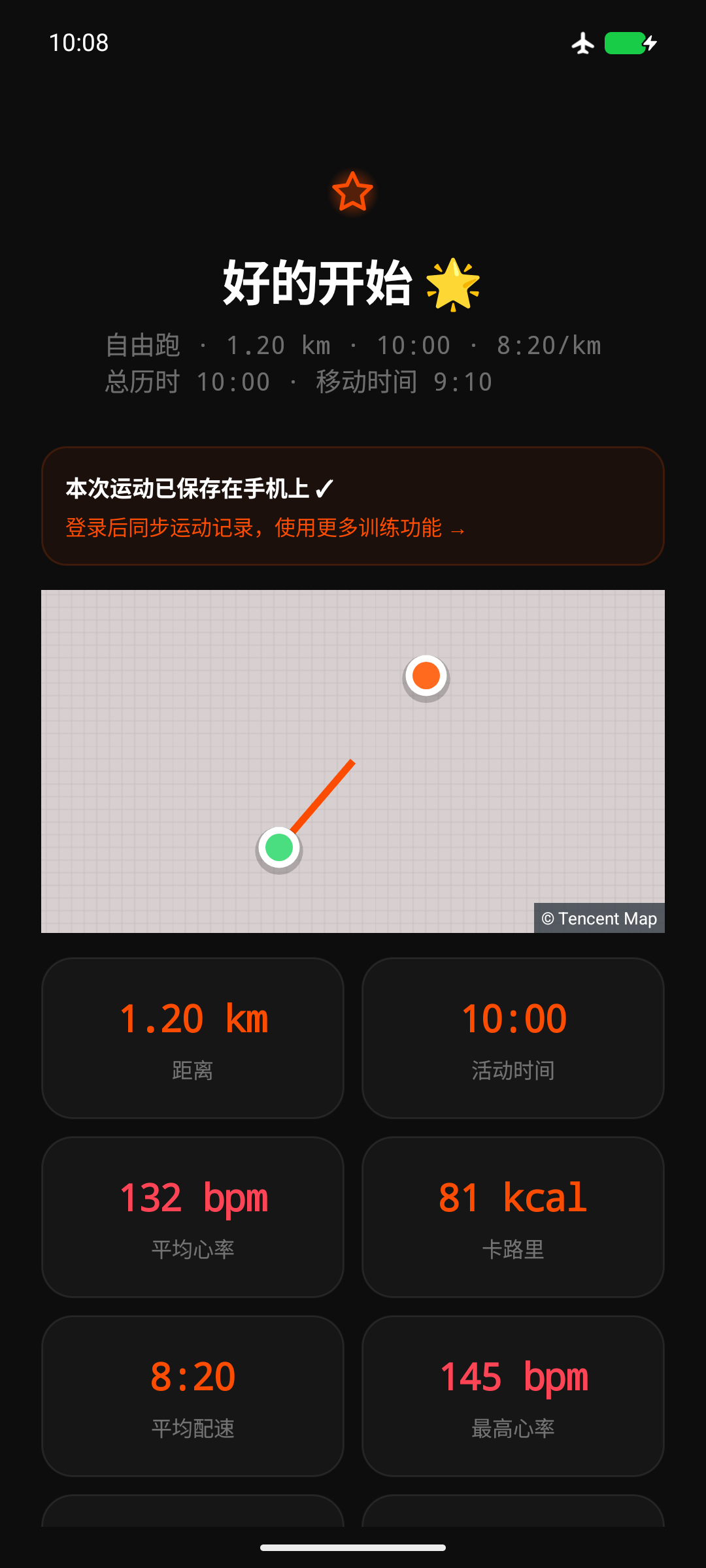
LOOK AHEAD
02 — Glasses and wearablesLet each device do its part,
so you can focus on the road ahead.
Install the Sport Master Android app on your phone for activity tracking, training schedules, device management and reviews.
The same Android test app connects to glasses through the Rokid-L SDK. After authorizing and connecting in the phone's Devices page, you can send activity data and a selected route to compatible glasses.
Compatible sensors can supply metrics such as heart rate. Support depends on the model, protocol and firmware; estimates are not presented as measurements when data is missing.
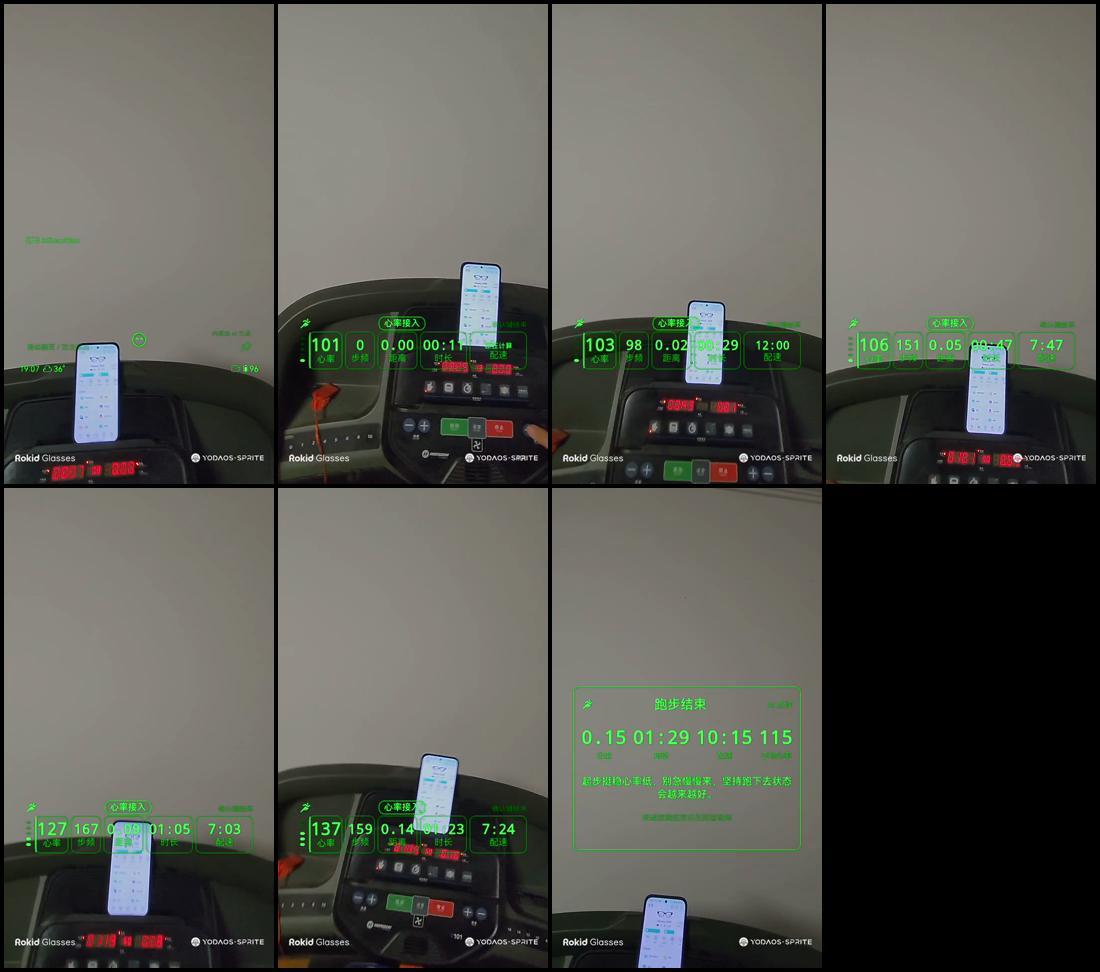
Phone exercise and Rokid glasses integration use the same test app below, installed on an Android phone. Glasses integration requires compatible hardware, firmware and authorization.
Current screenshots are historical or conceptual; text within the images is unchanged.
MORE WAYS TO MOVE
Cycling, hiking and indoor exercise bring more choices to everyday activity. Indoor rowing is included in the test app; kayaking, equestrian activities and other directions are still being explored.
YOUR NEXT STEP
Download the latest Android test app. Phone tracking and Rokid glasses integration use the same installer.
ANDROID + ROKID
Install it on an Android phone; phone exercise features work without glasses. An existing installation with the same package name can be updated in place.
Download Android device test app Installation and checksum information ↗ This round's test checklist (including AI coach)Update 154: the home screen now proactively asks for separate TianDiTu map permission; existing permission does not need repeated confirmation. After location access is allowed, the phone's real position identifies the city for route browsing, while a city selected manually is retained. If location or city lookup is unavailable, choose a city manually; a default city is not presented as a GPS result. Software checks do not establish outdoor GPS or physical-device acceptance.
151 highlights: online Tianditu routes gain a white casing, with clearer start, finish and actual-location markers, prompts and map controls. This includes the 149–150 fixes for real phone cadence, real basemaps in drawing and posters, and map-consent entry points. Software validation is complete; actual device behavior still needs testing. Official filing, copyright and approval materials remain unverified. The release owner will publish this version manually.
Retained from 147: domestic route maps use Tianditu. You can independently allow or decline map services before first viewing. Activity records, route selection and Share this journey use the same map interface, preserving actual disconnected track segments and offline maps. Recording in the official Rokid AI App is deferred at the user’s request. Sport Master’s post-activity shared-video export remains available; these are separate features. The overseas Google Maps edition still needs separate configuration and release.
Four languages remain available: 中文, 日本語, English and Français. Choose on the login page or under Settings & About → App language, or follow the system. Common screens, training prompts, indoor entertainment and glasses HUD text follow your selection; names, route names and historical text retain their originals. New AI coach conversations support the selected language. Speech recognition and read-aloud depend on corresponding services installed and available on the phone; cloud speech remains limited to actually supported Chinese and English. All four languages use the same Rokid phone test app. Test actual audio, device interaction and lens display under your available conditions.
Retained features: the app checks for a newer version after opening and prompts only for a higher version. An unanswered prompt stays available; “Maybe next time” applies only to the current use. The same version, an initial request failure or activity recording does not interrupt use. A separate indoor rower entry remains: the phone uses native Bluetooth to connect to machines supporting standard FTMS, displaying stroke rate, pace per 500 meters, distance, power and available heart rate. Resistance or target power is available only where the device supports it. Rowing records are separate from running and cycling, missing values show “—”, and phone GPS drift is not accumulated. Wahoo KICKR ROLLR trainers and outdoor cycling remain available. Overseas distribution is still in preparation; the app is not yet on Google Play.
Companion WatchApp 1.0.8 (Sport Master / SportMate): the team supplies the watch app for matching models; do not use an older watch build for this test round. The indoor cycling screen uses trainer data relayed by the phone; Garmin native FIT files still record independently. Other brands and devices providing only standard heart-rate broadcasting supply only the data they actually support; this does not imply remote control of their native activities. Rowing does not yet offer watch activity synchronization or AI scheduling. Specific machine models, resistance control, physical-device interaction and locked-screen behavior still need testing; the watch IQ app is not yet listed in the store.
SHA-256
cfa47d159ede77d78e3040902ed8acf0c09cee1bfdc27f34f3d5d1ec932d415aWHAT’S NEW
First check your existing account and records after an in-place upgrade, the AI coach and route maps. Then revisit automatic training suggestions, reminders and daily/regional rankings. Mountaineering, formal Citywalk training and running-club tiers are not being expanded this round.
After downloading, follow your phone's installation prompts and allow this browser to install the app. For installation or usage issues, contact the team with the phone model, version and screenshots.2630281760@qq.com
GOOD TO KNOW
The current test app installs on an Android phone. Phone exercise and Rokid glasses integration use the same installer. For compatible glasses, authorize and connect on the phone's Devices page. You do not need to install the Sport Master APK on the glasses.
Yes. Download the same Android test app above and start with activity tracking, training plans and reviews. Glasses integration is an extension for compatible equipment.
Brand alone does not establish compatibility. Give the team the exact model, firmware and available protocols for confirmation. Support for heart rate, pace and other metrics can also vary.
AI suggestions depend on the current version, network and service status. Long-term memory requires authorization, and ongoing support is still evolving. For privacy details, see the Privacy Policy. Training suggestions are for general exercise reference only.
In the app, open Me → Settings & About → Support & FAQ, or contact 2630281760@qq.com. You can also visit the Support Center and Account Deletion Guide。